Protocols#

Protocols are a set of tasks that are executed in a specific order. Protocols are represented as directed acyclic graphs (DAGs) where nodes are tasks and edges are dependencies between tasks. Tasks part of a protocol can pass parameters, devices, and resources to each other using EOS’ reference system. Task parameters may be fully defined, with values provided for all task parameters or they may be left undefined by denoting them as dynamic parameters. Protocols with dynamic parameters can be used to run campaigns of protocol runs, where an optimizer generates the values for the dynamic parameters across repeated protocol runs to optimize some objectives.

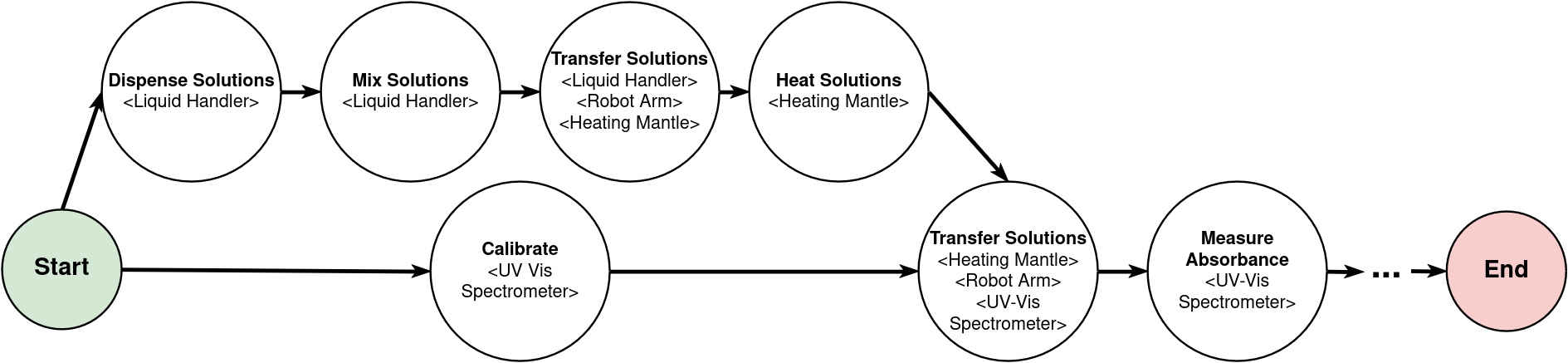
Example protocol graph

Above is an example of a possible protocol that could be implemented with EOS. There is a series of tasks, each requiring one or more devices. In addition to the task precedence dependencies with edges shown in the graph, there can also be dependencies in the form of parameters, devices, and resources passed between tasks. For example, the task “Mix Solutions” may take as input parameters the volumes of the solutions to mix, and these values may be output from the “Dispense Solutions” task. Tasks can reference input/output parameters, devices, and resources from other tasks.

Protocol Implementation#

  • Protocols are implemented in the protocols subdirectory inside an EOS package

  • Each protocol has its own subfolder (e.g., protocols/optimize_yield)

  • There are two key files per protocol: protocol.yml and optimizer.py (for running campaigns with optimization)

YAML File (protocol.yml)#

Defines the protocol. Specifies the protocol type, labs, and tasks

Below is the protocol YAML file for the color mixing example. It uses a color_station device that handles both mixing and analysis, a robot_arm for moving containers, and a cleaning_station for cleanup:

protocol.yml

type: color_mixing
desc: Protocol to find optimal parameters to synthesize a desired color

labs:
  - color_lab

tasks:
  - name: retrieve_container
    type: Retrieve Container
    desc: Get a container from storage and move it to the color dispenser
    duration: 5
    devices:
      robot_arm:
        lab_name: color_lab
        name: robot_arm
      color_station:
        allocation_type: dynamic
        device_type: color_station
    resources:
      beaker:
        allocation_type: dynamic
        resource_type: beaker
    dependencies: []

  - name: mix_colors
    type: Mix Colors
    desc: Mix the colors in the container
    duration: 20
    devices:
      color_station: retrieve_container.color_station
    resources:
      beaker: retrieve_container.beaker
    parameters:
      cyan_volume: eos_dynamic
      cyan_strength: eos_dynamic
      magenta_volume: eos_dynamic
      magenta_strength: eos_dynamic
      yellow_volume: eos_dynamic
      yellow_strength: eos_dynamic
      black_volume: eos_dynamic
      black_strength: eos_dynamic
      mixing_time: eos_dynamic
      mixing_speed: eos_dynamic
    dependencies: [retrieve_container]

  - name: analyze_color
    type: Analyze Color
    desc: Analyze the color of the solution in the container and output the RGB values
    duration: 2
    devices:
      color_station: mix_colors.color_station
    resources:
      beaker: mix_colors.beaker
    dependencies: [mix_colors]

  - name: score_color
    type: Score Color
    desc: Score the color based on the RGB values
    duration: 1
    parameters:
      red: analyze_color.red
      green: analyze_color.green
      blue: analyze_color.blue
      total_color_volume: mix_colors.total_color_volume
      max_total_color_volume: 300.0
      target_color: eos_dynamic
    dependencies: [analyze_color]

  - name: empty_container
    type: Empty Container
    desc: Empty the container and move it to the cleaning station
    duration: 5
    devices:
      robot_arm:
        lab_name: color_lab
        name: robot_arm
      cleaning_station:
        allocation_type: dynamic
        device_type: cleaning_station
        allowed_labs: [color_lab]
    resources:
      beaker: analyze_color.beaker
    parameters:
      emptying_location: emptying_location
    dependencies: [analyze_color]

  - name: clean_container
    type: Clean Container
    desc: Clean the container by rinsing it with distilled water
    duration: 5
    devices:
      cleaning_station: empty_container.cleaning_station
    resources:
      beaker: empty_container.beaker
    parameters:
      duration: 2
    dependencies: [empty_container]

  - name: store_container
    type: Store Container
    desc: Store the container back in the container storage
    duration: 5
    devices:
      robot_arm:
        lab_name: color_lab
        name: robot_arm
    resources:
      beaker: clean_container.beaker
    parameters:
      storage_location: container_storage
    dependencies: [clean_container]

Let’s dissect this file:

type: color_mixing
desc: Protocol to find optimal parameters to synthesize a desired color

labs:
  - color_lab

Every protocol has a type. The type is used to identify the class of protocol. When a protocol is running then there are instances of the protocol (protocol runs) with different IDs. Each protocol also requires one or more labs.

Now let’s look at the first task in the protocol:

- name: retrieve_container
  type: Retrieve Container
  desc: Get a container from storage and move it to the color dispenser
  duration: 5
  devices:
    robot_arm:
      lab_name: color_lab
      name: robot_arm
    color_station:
      allocation_type: dynamic
      device_type: color_station
  resources:
    beaker:
      allocation_type: dynamic
      resource_type: beaker
  dependencies: []

The first task is named retrieve_container. This task demonstrates several key concepts:

Named Devices: Devices are specified as a dictionary where each key is a named reference (e.g., robot_arm, color_station). These names are used by the task implementation to access the device.

Specific Device Allocation: The robot_arm device is explicitly assigned:

robot_arm:
  lab_name: color_lab
  name: robot_arm

This tells EOS to use the specific robot arm device from the color_lab.

Dynamic Device Allocation: The color_station uses dynamic allocation:

color_station:
  allocation_type: dynamic
  device_type: color_station

The scheduler will automatically select an available color_station device from the protocol’s labs when this task is ready to execute.

Dynamic Resource Allocation: The beaker resource is dynamically allocated from available beakers of type beaker.

Let’s look at the next task:

- name: mix_colors
  type: Mix Colors
  desc: Mix the colors in the container
  duration: 20
  devices:
    color_station: retrieve_container.color_station
  resources:
    beaker: retrieve_container.beaker
  parameters:
    cyan_volume: eos_dynamic
    cyan_strength: eos_dynamic
    magenta_volume: eos_dynamic
    magenta_strength: eos_dynamic
    yellow_volume: eos_dynamic
    yellow_strength: eos_dynamic
    black_volume: eos_dynamic
    black_strength: eos_dynamic
    mixing_time: eos_dynamic
    mixing_speed: eos_dynamic
  dependencies: [retrieve_container]

This task demonstrates device and resource references:

Device Reference: color_station: retrieve_container.color_station tells EOS that this task must use the same color_station device that was allocated to the retrieve_container task. This ensures that the beaker stays at the same station where it was placed.

Resource Reference: beaker: retrieve_container.beaker passes the beaker resource from the previous task to this one.

Dynamic Parameters: The mixing parameters are set to eos_dynamic, which is a special keyword in EOS for defining dynamic parameters. These must be specified either by the user or an optimizer before a protocol run can be executed.

The analyze_color task shows another device reference:

- name: analyze_color
  type: Analyze Color
  desc: Analyze the color of the solution in the container and output the RGB values
  duration: 2
  devices:
    color_station: mix_colors.color_station
  resources:
    beaker: mix_colors.beaker
  dependencies: [mix_colors]

Here, color_station references the same station from the mix_colors task, ensuring the analysis happens at the same station where the color was mixed.

Optimizer File (optimizer.py)#

Contains a function that returns the constructor arguments for and the optimizer class type for an optimizer.

As an example, below is the optimizer file for the color mixing protocol:

optimizer.py

from bofire.data_models.acquisition_functions.acquisition_function import qUCB
from bofire.data_models.enum import SamplingMethodEnum
from bofire.data_models.features.continuous import ContinuousOutput, ContinuousInput
from bofire.data_models.objectives.identity import MinimizeObjective

from eos.optimization.sequential_bayesian_optimizer import BayesianSequentialOptimizer
from eos.optimization.abstract_sequential_optimizer import AbstractSequentialOptimizer


def eos_create_campaign_optimizer() -> tuple[dict, type[AbstractSequentialOptimizer]]:
    constructor_args = {
        "inputs": [
            ContinuousInput(key="mix_colors.cyan_volume", bounds=(0, 25)),
            ContinuousInput(key="mix_colors.cyan_strength", bounds=(2, 100)),
            ContinuousInput(key="mix_colors.magenta_volume", bounds=(0, 25)),
            ContinuousInput(key="mix_colors.magenta_strength", bounds=(2, 100)),
            ContinuousInput(key="mix_colors.yellow_volume", bounds=(0, 25)),
            ContinuousInput(key="mix_colors.yellow_strength", bounds=(2, 100)),
            ContinuousInput(key="mix_colors.black_volume", bounds=(0, 25)),
            ContinuousInput(key="mix_colors.black_strength", bounds=(2, 100)),
            ContinuousInput(key="mix_colors.mixing_time", bounds=(1, 45)),
            ContinuousInput(key="mix_colors.mixing_speed", bounds=(100, 200)),
        ],
        "outputs": [
            ContinuousOutput(key="score_color.loss", objective=MinimizeObjective(w=1.0)),
        ],
        "constraints": [],
        "acquisition_function": qUCB(beta=1),
        "num_initial_samples": 10,
        "initial_sampling_method": SamplingMethodEnum.SOBOL,
    }

    return constructor_args, BayesianSequentialOptimizer

The optimizer.py file is optional and only required for running protocol run campaigns with optimization managed by EOS.