
Laboratories#
A laboratory groups computers, Devices, and Resources used by protocols.
Define it in labs/<lab_name>/lab.yml inside an EOS package.
Example#
name: solar_cell_lab
desc: Fabrication and characterization of solar cells

computers:
  xrd_computer:
    ip: 192.168.1.101
    desc: X-ray diffraction control

devices:
  spin_coater:
    type: spin_coater
    computer: eos_computer
    meta:
      location: glovebox
  xrd_system:
    type: xrd
    computer: xrd_computer
    init_parameters:
      port: 5003

resource_types:
  vial:
    meta:
      capacity_ml: 20

resources:
  precursor_vial:
    type: vial
    meta:
      location: glovebox
Computers#
The built-in eos_computer represents the orchestrator at 127.0.0.1.
Define computers only for additional machines, each with an IP address.
Neither the built-in name nor its address can be reused.
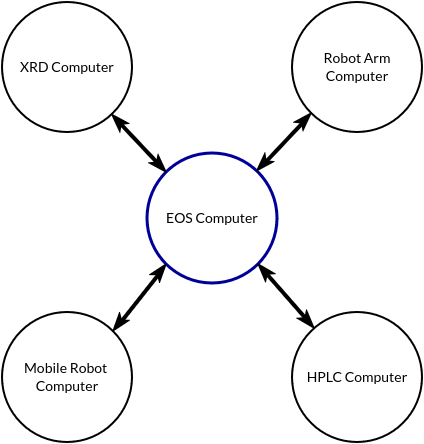
See Multi-Computer Lab Setup to join workers to the Ray cluster and Infrastructure Setup for network requirements.
Devices#
Device names must be unique within a lab. Multiple instances may share a device type.
Field |
Meaning |
|---|---|
|
A device specification from an EOS package. |
|
|
|
Values for fields of the device’s |
|
Optional instance metadata, such as location. |
Resources#
resource_types defines types and their default metadata. resources defines named
instances whose metadata overrides those defaults. Resource names must be unique across labs.
See Resources for task declarations, dynamic allocation, and passing resources between tasks.